Digitize Parts Identification and 
Ordering Without 
Replacing Your ERP

Turn parts diagrams into interactive catalogs connected to your existing systems. Help dealers, customers, and service teams find the part information they need.

For OEM publishers   |   For VARs and systems integrators

Explore an example catalog in a 15-minute introductory demo. No files or preparation required.

Choose your parts workflow

Start with the way you publish and support parts. Explore the information that fits your business.

For equipment manufacturers

OEM publishers

Help dealers and technicians find the correct replacement part and continue into your ordering process.

  • Visual identification in your parts catalog
  • Connected part details and ordering
  • Support for your aftermarket customer relationships

For delivered systems

VARs and systems integrators

Bring diagrams and parts documentation from multiple suppliers together around the system you deliver.

  • Component identification across assemblies
  • Supplier documentation for service teams
  • Catalog capacity matched to your deployments

Your 15-minute introductory demo uses an example catalog. No files or preparation required.

Hear from our Clients

“Our customers are often searching for and buying replacement parts from the shop floor, their garage, a construction site, so it needed to work great on all mobile devices. Envalo’s Interactive Parts Schematic App has revolutionized the service and support we provide to our customers.”
Author
Customer Response Director, Enerco Group, Inc.
” Envalo took time to understand the opportunity before us and worked with us to architect and implement an integrated B2B software solution that helped us nail down a $40 million contract. They are constantly improving the B2B experience for our customers and anticipating our needs. “
Author
~ President of B2B Promotional Products Distributor to Fortune 1000

See the Stavemill teaser

Watch the Stavemill teaser. Select the preview for a larger view.

From assembly diagram to the next action

Interactive Parts Schematics gives your dealers, customers, and service technicians a visual workflow for finding parts information.

This image is missing an alt tag 1. Select an assembly: find the relevant diagram in your catalog.
This image is missing an alt tag 2. Identify a part: use the interactive diagram to locate the item.
This image is missing an alt tag 3. Review details: consult the connected parts information.
This image is missing an alt tag 4. Take the next action: request a quote, open a product page, or continue to ordering, depending on your setup.

Review your ERP and e-commerce integration requirements with us. Book a 15-minute demo using an example catalog. No files or preparation required.


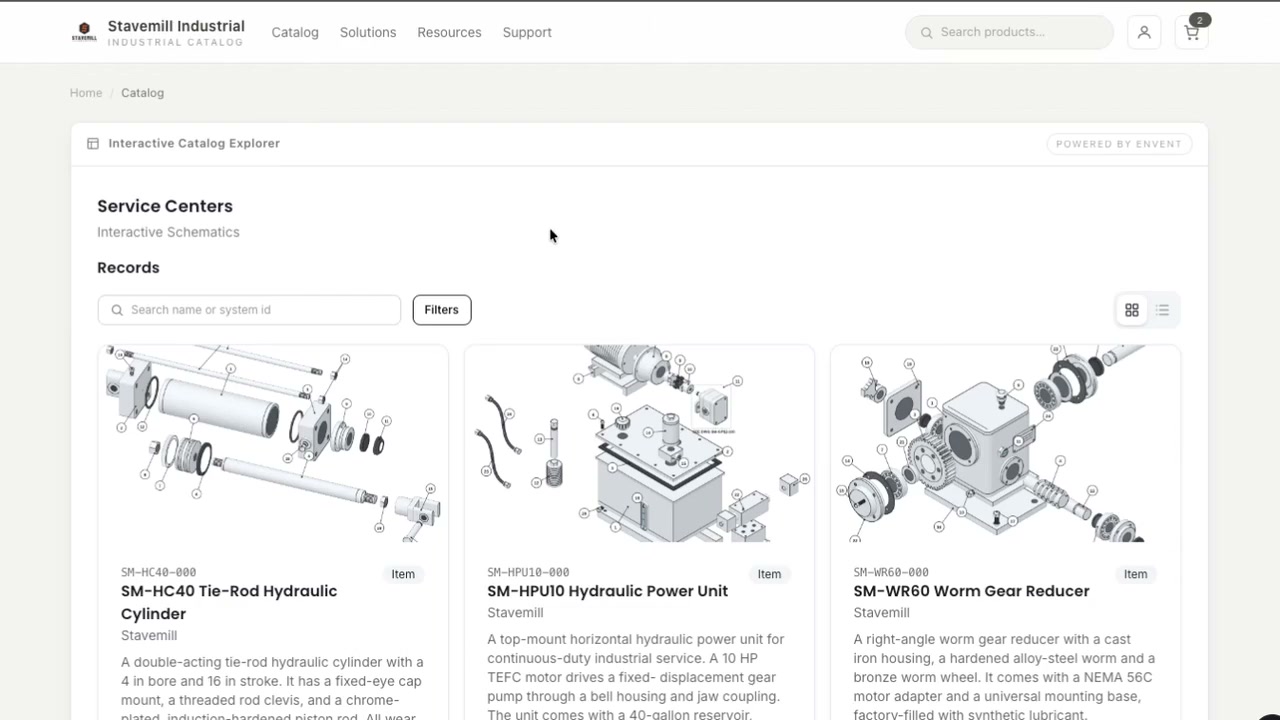
See the assembly before choosing a part

Example Stavemill catalog interface showing search, filters, and complete assembly diagrams
Example Stavemill catalog: see the assembly diagrams alongside search, filters, and catalog information.
View the full product screenshot in a larger window ↗

Make parts support easier to manage

Give your dealers and service teams a practical reference for parts questions. Use Interactive Parts Schematics to support the catalog or equipment documentation you manage.

For OEM publishers

Help your dealers identify replacement parts within your own catalog and prepare an ordering inquiry.

  • Give dealers a visual reference for discussing the assembly and part they need.
  • Keep your catalog at the center of the replacement-parts conversation.
  • Focus support conversations on fit, compatibility, and questions that need your expertise.

For VARs and systems integrators

Help your service teams navigate assembly diagrams and component information across the systems you deliver.

  • Bring multi-supplier equipment documentation into a useful service reference.
  • Help technicians locate component information when planning maintenance.
  • Give customers and support teams a shared reference for equipment questions.

Proven to Cut Downtime

and Boost Parts Sales

First, we ask questions to help identify your greatest areas of need. Then, leveraging your current systems and data, we integrate solutions to help you transform your digital strategy, streamline your workflows and better serve your customers – all at affordable price points.

See your parts workflow in 15 minutes

Explore Interactive Schematics in a 15-minute introductory demo using an example catalog. Discuss OEM parts identification and ordering, or documentation for the systems you integrate.

No files or preparation are required. A custom-data session can follow after a review of your catalog and integration needs.

Book a 15-minute demo